Competitor Price Monitoring for Small Shops: Check Rivals Every Weekday at 7:30am
You don't need enterprise pricing software to know when a rival cuts their price. Here is what to track, four ways to do it with October 2026 prices, and a weekday check that writes to a sheet and emails you only what changed.

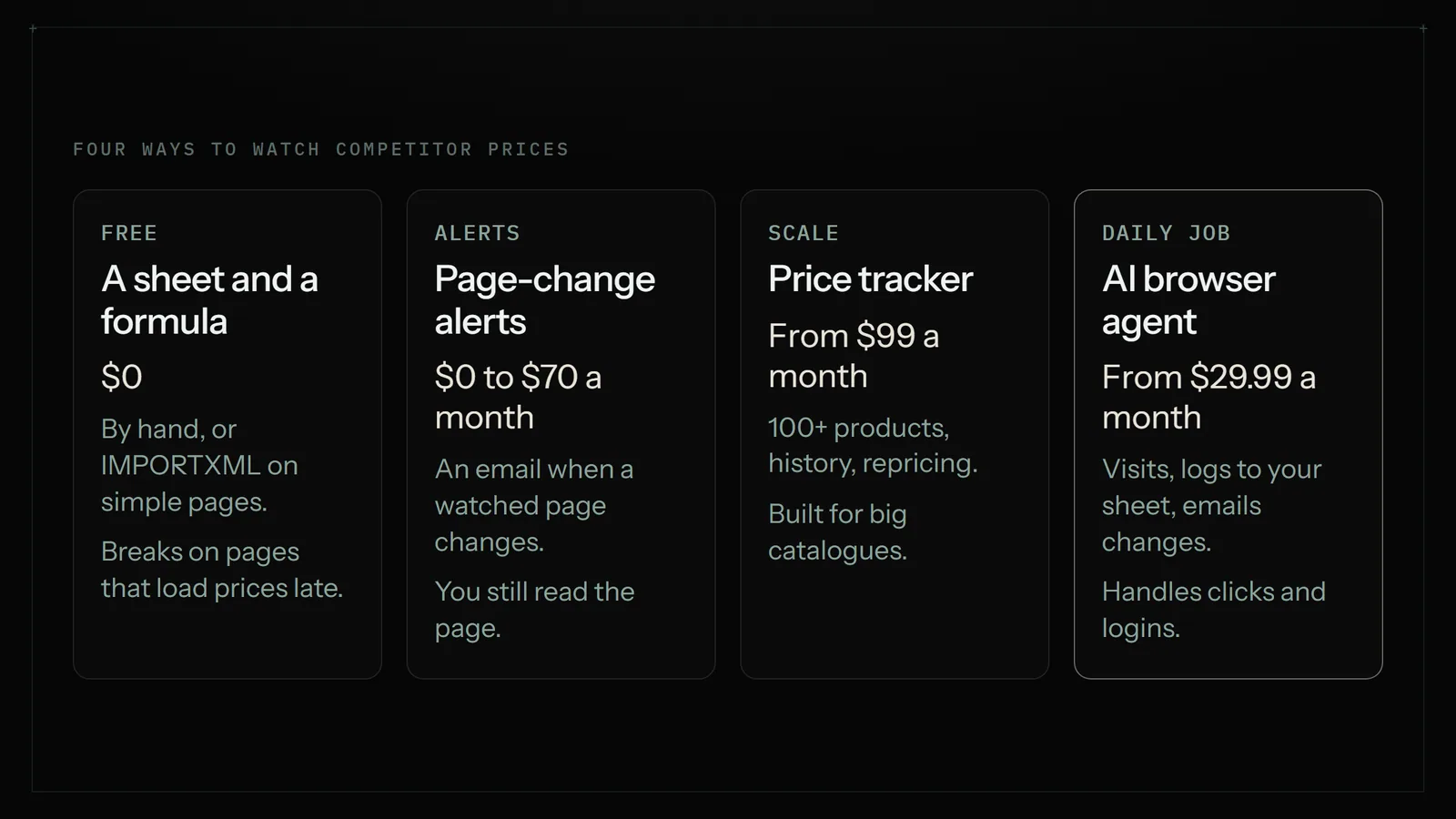
For a small shop, competitor price monitoring means checking 5 to 20 rival listings on a schedule and logging price, shipping, sales and stock in a sheet. Do it by hand or with a free Google Sheets formula. Use Visualping (free for 5 pages) for alerts, Prisync ($99/mo) for 100+ products, or an AI browser agent such as Astarii, from $29.99/mo, for a daily check that emails the changes.
Most small shops already monitor competitor prices. It just looks like this: a few open tabs on a Monday, a rival's listing you check "when you remember", and a vague sense that someone undercut you last month. It works until you get busy, which is exactly when a competitor's sale or a price rise matters most.
This guide is for owners with a handful of products and a handful of rivals: Etsy sellers, Shopify and WooCommerce shops, makers and resellers. It covers what to track, the four ways to do it from free to $399 a month, and how to set up a check that runs every weekday at 7:30am, writes the prices into a Google Sheet and emails you only what changed. Astarii is one of the options, set up with a schedule and a plain-English instruction; it gets the same honest treatment as the rest, including when a dedicated price tool is the better buy.
What competitor price monitoring means for a small shop
Competitor price monitoring is checking what your rivals charge for products like yours, on a regular schedule, and writing it down so you can see changes over time. Big retailers do it across thousands of products several times a day and feed the results into software that reprices automatically. A small shop needs much less:
- A short list. Your 5 to 20 best sellers, and the 3 to 5 rivals buyers actually compare you with.
- A steady rhythm. Once a weekday, or even weekly, is enough for most handmade and niche goods. Prices there don't move by the hour.
- A record. One row per product per day in a sheet, so "they dropped their price" becomes "they went from $34 to $28 on the 14th and back on the 21st".
- A human decision. The point is to know, not to auto-match. You decide whether to follow a cut, hold your price or ignore it.
The last point is worth saying early. Automatic repricing makes sense for sellers of identical goods competing for one buy button. Most small shops sell something that is at least a little different, and racing a rival to the bottom is a good way to lose margin on work buyers would have paid for.
What to track (it's more than the price)
The sticker price is only part of what a buyer compares. Write these down for each rival listing:
- Price as shown, and the sale price if there is one.
- Shipping cost to your main market. A $24 item with $6 shipping loses to a $28 item with free shipping more often than you'd think.
- Sale or coupon text: "20% off", "free shipping over $35", "ends Sunday".
- Stock or availability: sold out, low stock, made to order.
- Delivery time if they show one. Rush-friendly listings win gift buyers in November and December.
- The date and time you checked. Without it, a sheet of prices is just a snapshot.
Keep the list short. Each extra column is something a person or a tool has to find on every page, every day. Price, shipping, sale text and stock cover most decisions.
Four ways to monitor competitor prices
Here are the realistic options for a small shop, with prices checked on each vendor's own pricing page in October 2026.
| Option | Cost | How often | Handles logins and clicks? | Best for |
|---|---|---|---|---|
| By hand, with a sheet | Free, plus your time | Whenever you remember | Yes (you) | Under 5 products, or getting started |
| Google Sheets IMPORTXML formula | Free | About hourly while the sheet is open | No | Simple public pages with prices in the page HTML |
| Visualping (page-change alerts) | Free for 5 pages; Personal from $14/mo | Every 60 min free; down to 2 min on paid plans | Can record a login and clicks before each check | Alerts when one page changes |
| Prisync (dedicated price tracker) | $99/mo for up to 100 products | 3 times a day | Built for public product pages | Shops with 50+ products and many rivals |
| Price2Spy (dedicated price tracker) | Starter about $40/mo (third-party listings) | Daily alerts on Starter | Built for public product pages | Growing shops that want reports and repricing later |
| AI browser agent (Astarii) | From $29.99/mo, all jobs included | On your schedule, e.g. weekdays 7:30 | Yes; sign-in codes pause and ask you | A few dozen products, plus a sheet and a summary email |
1. By hand, with a spreadsheet
Make a Google Sheet with columns for date, product, rival, URL, price, shipping, sale text and stock. Open each link, fill a row, done. With 10 products and 4 rivals that's 40 page visits, roughly 20 to 30 minutes if nothing loads slowly. It costs nothing, it teaches you what matters before you pay for anything, and it is the right answer for a shop with five products. The problem is that it's the first job dropped in a busy week.
2. A free Google Sheets formula
Google Sheets can pull data straight from a web page with IMPORTXML (or IMPORTHTML for tables). You give it the page URL and a path to the price on the page, and the cell fills in. According to Google's help page on import functions, these formulas check for updates every hour while the document is open; simply reopening the sheet doesn't force a refresh.
It's free and good for learning, but in practice it breaks often on shop pages. Many product pages load their prices with JavaScript after the page opens, so the formula comes back empty. Shops change their page layout and the path stops matching. Some sites block automated requests. And because it refreshes while the sheet is open, there's no built-in history: you'd need a script to copy each day's value into a new row. If your rivals' pages work with it, use it. If you spend an evening fighting error messages, move on.
3. Page-change alert tools
Tools like Visualping watch a page, or one part of it, and email you when it changes. Visualping's free plan covers 5 pages and 150 checks a month at most every 60 minutes; the paid Personal plans run from $14 a month (1,000 checks, 10 pages) to $70 a month (10,000 checks, 40 pages), cheaper if billed yearly. Every plan can record actions like logging in or clicking before a check. Logging changes into Google Sheets is a Business feature, from $140 a month or $100 a month billed yearly.
This is the best pick when you care about a few specific pages and want to know the minute something moves. It's weaker as a daily price table: you get an alert that the page changed, then you still read it and write the number down yourself unless you pay for the Sheets integration.
4. Dedicated price tracking software
Prisync and Price2Spy are built for this one job. Prisync's URL-based Professional plan is $99 a month for up to 100 products with unlimited competitors and price updates three times a day; Premium is $199 for 1,000 products and adds a dynamic pricing engine and daily email notifications. Both come with a 14-day free trial. Price2Spy's pricing page lists Starter, Basic and Premium tiers with daily price change alerts on Starter and repricing as a paid add-on; it doesn't show prices on the page, and comparison sites put Starter at about $40 a month for up to 500 URLs.
If you sell 100+ products against many rivals, or you sell branded goods and need to watch minimum advertised prices, these are the right tools and nothing below replaces them. For a shop with 15 products, $99 a month is a lot for a table you'll read once a day.
The 7:30am weekday check, step by step
Here's a setup that works for most small shops, whichever tool does the visiting. We'll describe it with an Astari doing the work, since that's the version that needs no formulas.
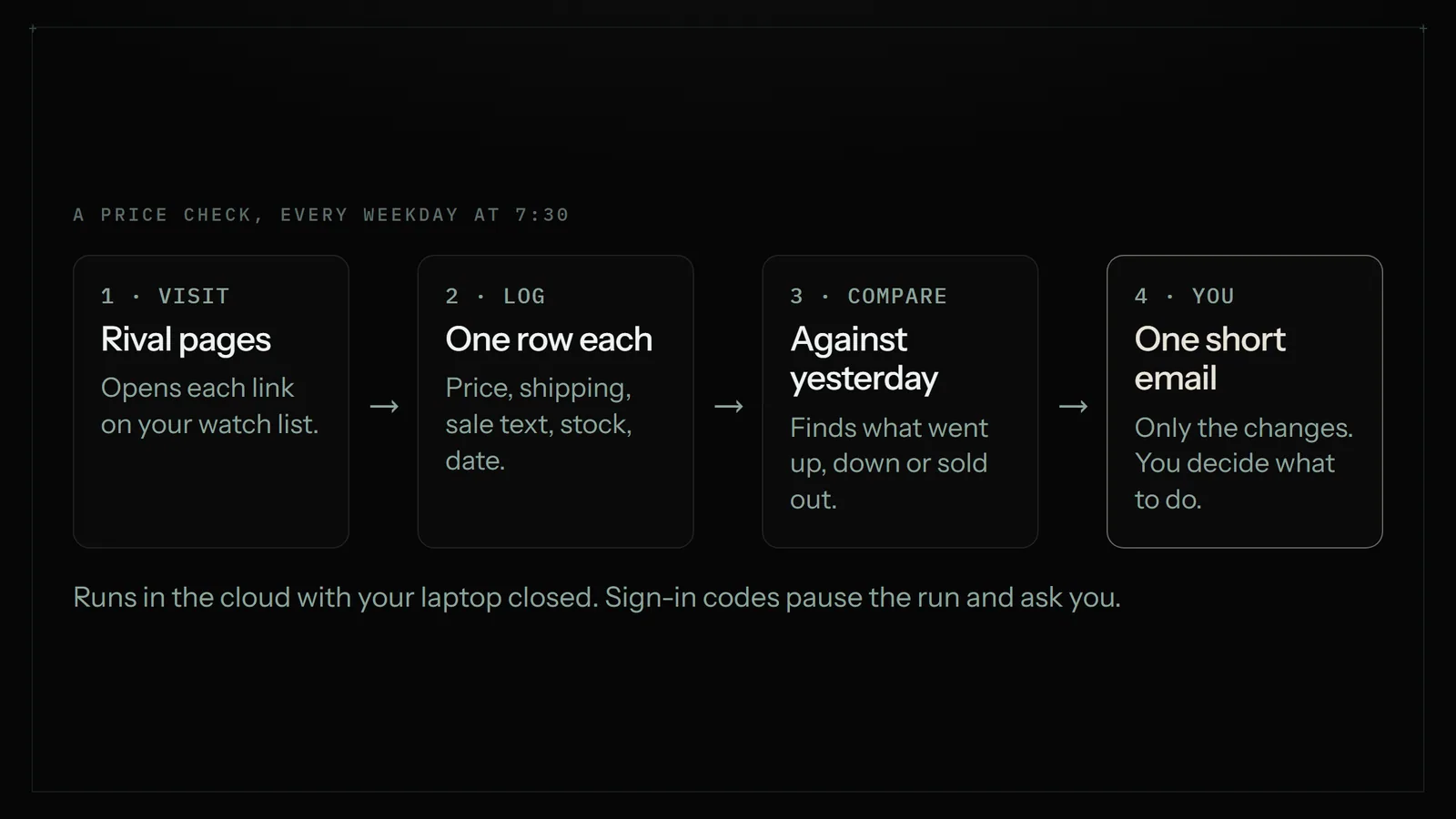
- Build the list. In a Google Sheet tab called "Watch list", put one row per rival product: your product name, the rival, and the URL. Start with 10 to 20 rows. More can come later.
- Make the log tab. A second tab called "Prices" with columns: date, product, rival, price, shipping, sale text, in stock, URL.
- Write the instruction. In plain English: which sheet to read, what to collect from each page, where to write it, and what counts as worth an email. Ready-to-copy examples are in Say it to an Astari below.
- Show it once if a page is awkward. If a rival hides shipping behind a "Calculate" button, show the Astari the clicks once. See your first Astari.
- Connect Sheets and Gmail. So it writes into your sheet and emails you directly. See connections.
- Set the schedule. Every weekday at 7:30. The run happens in the cloud, so your laptop can be closed.
- Read one email a day. "3 changes: Rival B cut the large tote from $42 to $36; Rival C sold out of the blue mug; Rival A added free shipping over $35." Everything else stays in the sheet.
Run it by hand for the first two or three days and check the rows against the pages yourself. Once it matches, leave it to the schedule.
What it costs in minutes
Astarii plans are metered in minutes of real run time. Pro is $29.99 a month with 900 cloud minutes. If your check of 20 pages takes around 10 minutes, a run every weekday uses roughly 220 minutes a month, which leaves most of the pool for other jobs like the Friday invoice sheet or a morning Etsy order check. Run length depends on the sites, so time your first runs rather than trusting this estimate. Full details are on the pricing page.
Watching prices on Etsy, Shopify and marketplaces
Etsy. Rival listings are public, so any of the methods above can read them. Prices on Etsy often depend on the variation chosen (size, colour, personalisation), so note which option you're comparing, or ask the check to pick the same variation each time. Shipping varies by the buyer's country; compare to your main market. If you also want to act on what you find, the Astarii Etsy Manager can update your own prices and descriptions, but every change to the live shop is proposed first and made only when you approve it. Bulk changes are covered in updating Etsy prices without opening every listing.
Shopify and WooCommerce stores. Most product pages show the price and stock plainly. Some show shipping only at checkout; in that case track the free-shipping threshold from the banner instead.
Amazon. Amazon sellers live in a different world of dedicated repricing tools, including Amazon's own automated pricing rules in Seller Central. If you compete for the Buy Box on identical goods, use those; a once-a-day check is too slow for that market.
Trade and supplier portals. This is where a browser agent earns its keep. If you watch a wholesaler's price list or a distributor portal you have to sign in to, formulas and most trackers can't follow. An Astari signs in with your saved login; passwords are encrypted in your browser before they're stored and are never shown to the AI, and if the portal texts a code, the run pauses and asks you, then carries on.
What to do when a rival changes their price
The data is only useful if you know in advance what you'll do with it. A simple rule set for a small shop:
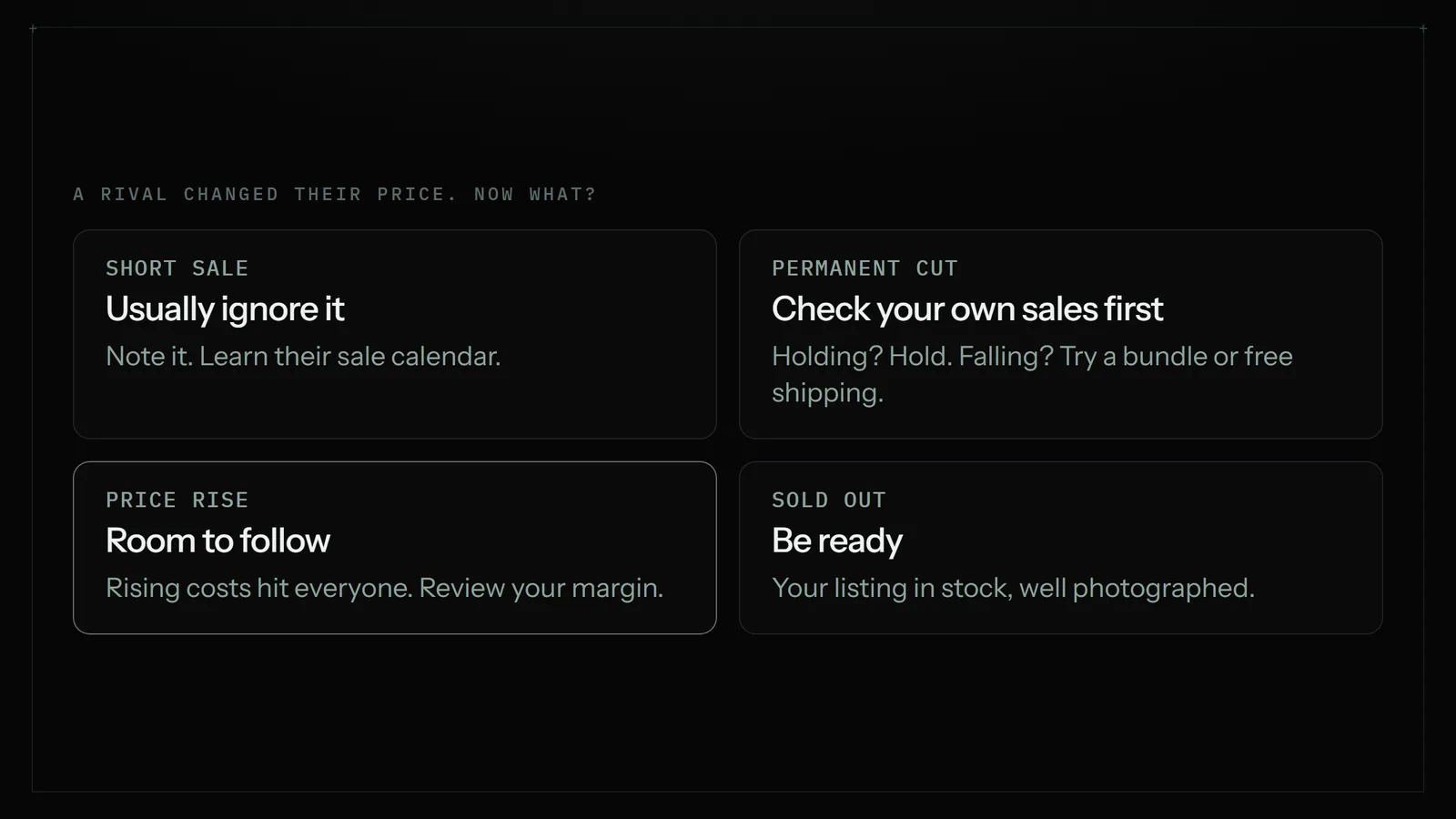
- A short sale (a few days, with an end date): usually ignore it. Note it in the sheet. If the same rival runs one every month, you've learned their calendar.
- A permanent cut on a product that competes head on: look at your own numbers first. If your sales of that item haven't dropped, hold. If they have, consider a smaller change, a bundle, or free shipping instead of a matching cut.
- A price rise: often the most useful signal. Rising material or shipping costs hit everyone, and a rival's rise may give you room to follow.
- Sold out: make sure your listing for the same kind of product is in stock, well photographed and ready.
- New free-shipping threshold: check yours against it. Buyers compare totals.
Keep the final call yourself. That's also how Astarii is built: it reports, and any change to your live shop waits for your yes.
When an AI browser agent is the wrong pick
- Hundreds or thousands of products. Prisync, Price2Spy and similar tools are built for scale, with product matching, history and dashboards. An agent visiting pages one by one is the slower, more expensive way to watch 2,000 URLs.
- You need alerts within minutes. Visualping's paid plans check as often as every 2 minutes. A scheduled agent run suits daily or a few times a day.
- You want automatic repricing. Astarii proposes changes to your shop for approval; it doesn't reprice on its own. If hands-off repricing is the goal, use a tool built for it.
- Five products and a free afternoon a week. Do it by hand in a sheet. Pay for a tool when the habit slips, not before.
Where an agent fits is the middle: a few dozen products, some pages that need clicks or a login, and a want for the results in your own sheet with a plain summary in your inbox. That's the same shape of job as copying website data into Google Sheets, just on a schedule. For how it compares with connector tools, see Zapier vs an AI browser agent, and for other jobs worth handing off, the 15 jobs small businesses hand off first.
A note on being a good neighbour
Checking a rival's public product page once a day is what any customer does. Hammering a small competitor's site every few minutes is not. Keep the rhythm sensible, check a site's terms if you're unsure, and never try to get around a login, paywall or block that isn't yours to pass. The goal is to know the market, not to load someone else's server.
Getting started this week
Write down your ten best sellers and the rivals you lose sales to. Check them by hand once, into a sheet, so you know what the job looks like. Then pick the cheapest method that will actually run without you: a formula if the pages allow it, page alerts for a few key listings, a dedicated tracker if you're big, or an Astari on a weekday schedule if you want the whole job done and reported. The free trial gives you 3 runs of up to 15 minutes each with no card, enough to test the check on your own list. Start from your first Astari, then set the schedule.
Say it to an Astari
These are instructions you can give an Astari, word for word. It does the work in a browser, on a schedule if you want one, and asks you before anything goes live.
Questions
How do small businesses monitor competitor prices?
Most start with a Google Sheet: a list of rival product URLs and a daily or weekly row for each with price, shipping, sale text and stock. As the list grows they automate the visits with a Sheets formula, a page-change alert tool, a dedicated tracker or an AI browser agent on a schedule.
Is there a free way to track competitor prices?
Yes. Checking by hand into a sheet is free, Google Sheets' IMPORTXML formula can pull prices from simple pages and refreshes about hourly while the sheet is open, and Visualping's free plan watches 5 pages with 150 checks a month.
How much does competitor price monitoring software cost?
Prisync starts at $99 a month for up to 100 products and Premium is $199 for 1,000. Comparison sites list Price2Spy's Starter at about $40 a month. Visualping's paid Personal plans run $14 to $70 a month. Astarii plans start at $29.99 a month and cover other jobs too.
How often should I check competitor prices?
For handmade, niche and small-catalogue shops, once a weekday or even once a week is enough. Hourly or minute-by-minute checks only matter when you sell identical goods against many sellers, as on Amazon.
Why does IMPORTXML return an empty cell for a price?
Many shop pages load the price with JavaScript after the page opens, so the formula never sees it. The page layout may also have changed, or the site may block automated requests. In those cases use a tool that opens the page in a real browser.
Can I track competitor prices on Etsy?
Yes. Rival Etsy listings are public, so a sheet, an alert tool or a browser agent can read them. Note which variation you compare, since prices often change by size or personalisation, and compare shipping to your main market.
Should I automatically match a competitor's lower price?
Usually not for a small shop. Short sales are often best ignored, and a permanent cut is a prompt to check your own sales first. Consider a bundle or free shipping instead of a matching cut, and keep the final decision yourself.
Can an AI agent check prices on sites that need a login?
Astarii can sign in with your saved login. Passwords are encrypted in your browser before they are stored and are never shown to the AI, and if a site sends a sign-in code the run pauses and asks you, then carries on.
filed under Online selling